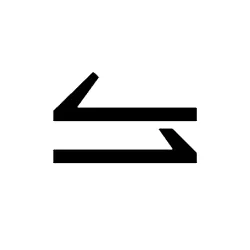
⥦ Left Harpoon with Barb Up Above Right Harpoon with Barb Up - Copy & Paste
Just Click on a Symbol to Copy.
⥦
Text copied to clipboard!
| Html Hex | ⥦ 🗋 |
| Html Decimal | ⥦ 🗋 |
| Win Alt Code | Alt+10598 🗋 |
| Url Escape Code | %E2%A5%A6 🗋 |
| Utf8 Hex | 0xE2 0xA5 0xA6 🗋 |
| Utf8 Binary | 11100010:10100101:10100110 🗋 |
| Utf16 | 0x2966 🗋 |
| Utf32 | 0x00002966 🗋 |
| Css Entity | \2966 🗋 |
| C Cpp Java Entity | "\u2966" 🗋 |
| Perl | \x{2966} 🗋 |
| Python2 | u"\u2966" 🗋 |
| Python3 | "\u2966" 🗋 |
| Ruby Swift Rust | \u{2966} 🗋 |
| Php | \u2966 🗋 |
| Sql | CHAR(0x2966) 🗋 |
Left Harpoon with Barb Up Above Right Harpoon with Barb Up ⥦ symbol can be used by copying and pasting. But whenever it is required in the document, it has to be generated. For that, alt+10598 code has to be typed.
Code To Type Symbols On Different Languages
Html Code
<span> ⥦ </span>
🗋
CSS Code
span {content: "\2966";}
🗋
JavaScript Code
<script> console.log("\u2966"); </script>
🗋
Python Code
print ( u"\u2966" )
🗋
Download Different Types of Symbol Images
Webp Image Download
PNG Image Download

SVG Image Download